


15

Nov, 2016

How to set-up domain emails with iphone

Posted by : Cid Systems   

November 15, 2016
How to set-up domain emails with iphone

This Article will show you How to setup email accounts with imap/pop with iphone
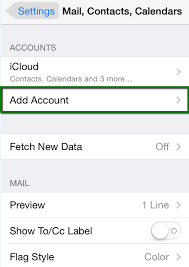
  1. To setup email account click on Mail or go to Settings
  2. Click on Accounts, then Add Accounts
  3. Tap Others, and Add Mail Account
  4. In the New mail account fill up the fields required:
  5. For this example we will be using [email protected]
  6. Name: Test
    Email: [email protected]
    Password: your password
    Description: auto fill
  7. Tap or click Next wait for a few seconds and select IMAP
  8. Scroll down to INCOMING MAIL SERVER
    Host Name: mail.yourdomainname
    Username: [email protected]
    Password: your password
  9. Next scroll and locate OUTGOING MAIL SERVER
  10. Enter your domain name in the hostname field
    Host Name: mail.yourdomainname
    Username: optional
    Password: optional
  11. Click Next if you input all information correctly then you will be on the IMAP page right now
  12. Select Save and the account is automatically added
  13. Click the Mail icon on your iphone and you can now send and receive emails.
  • How to Access Webmail to Delete Email in Horde

    October 02, 2020 04:58 pm
  • How to Access Webmail to Delete Email in Roundcube

    October 02, 2020 04:47 pm
  • How to Navigate Client Account on WHMCS

    August 28, 2020 03:31 pm
  • How to Backup from your cPanel Account

    August 28, 2020 02:58 pm
  • How to Backup from your Account Management System

    August 28, 2020 01:16 pm
  • -->